
1. Overview #
AMWAL Pay uses JSON Web Encryption (JWE) to protect webhook request payloads and provide an additional layer of security.
JWE encryption is applied in addition to:
- TLS for secure transport.
- HMAC-based payload integrity validation using
secureHashValue. - Merchant-specific encryption keys managed through the Merchant Portal.
The encrypted request body must use JWE Compact Serialization.
2. Cryptographic Contract #
The following cryptographic parameters must be used exactly as specified.
| Parameter | Value |
|---|---|
| Serialization | JWE Compact Serialization |
Key Management (alg) | dir — Direct Encryption |
Content Encryption (enc) | A128CBC-HS256 |
Key ID (kid) | Merchant Key ID (UUID) |
| Content Encryption Key (CEK) | 256-bit / 32-byte key |
| Payload Integrity | secureHashValue |
| Transport Security | TLS |
JWE Protected Header #
The JWE protected header must contain the encryption algorithm, encryption method, and Merchant Key ID.
{
  "alg": "dir",
  "enc": "A128CBC-HS256",
  "kid": "put_kid_value_here"
}
Header Parameters #
| Parameter | Description | Example |
|---|---|---|
alg | Key management algorithm | dir |
enc | Content encryption algorithm | A128CBC-HS256 |
kid | Merchant encryption key identifier | 550e8400-e29b-41d4-a716-446655440000 |
Important: The
kidvalue must match the Merchant Key ID configured for the merchant in the AMWAL Pay Merchant Portal.
3. Encryption Flow #
The merchant should encrypt every applicable request using the following sequence:
Prepare JSON Payload
       ↓
Calculate secureHashValue
       ↓
Add secureHashValue to JSON
       ↓
Serialize JSON
       ↓
Encrypt JSON using JWE
       ↓
Include kid in JWE Protected Header
       ↓
Send JWE Compact Serialization
       ↓
AMWAL Pay decrypts and validates the request
Step 1 — Prepare the Request #
Create the normal JSON request payload according to the API specification.
Example:
{
  "merchantId": 74417,
  "transactionId": "7d8fcf50-f075-11ed-b792-9d1241b63248",
  "amount": 100,
  "currencyCode": "512"
}
Step 2 — Generate secureHashValue #
Generate the secureHashValue according to the applicable AMWAL Pay API specification.
The secure hash must be generated before encryption.
The resulting payload should contain the secure hash:
{
  "merchantId": 74417,
  "transactionId": "7d8fcf50-f075-11ed-b792-9d1241b63248",
  "amount": 100,
  "currencyCode": "512",
  "secureHashValue": "84EB3BF8F62EF25717D1E9E13C3CFB719A890980BBF2631AFD8965182ADE1754"
}
Step 3 — Encrypt the Complete JSON Payload #
The complete JSON string, including secureHashValue, must be encrypted using:
alg = dir
enc = A128CBC-HS256
kid = Merchant Key ID
Step 4 — Send the Encrypted Request #
The resulting JWE Compact Serialization string is sent as the HTTP request body.
The request body is therefore not plain JSON when JWE encryption is enabled.
4. JWE Compact Serialization #
A JWE Compact Serialization value consists of five Base64URL-encoded components separated by periods:
Protected Header
.
Encrypted Key
.
Initialization Vector
.
Ciphertext
.
Authentication Tag
For direct encryption (dir), the encrypted key component is empty.
Example structure:
eyJhbGciOiJkaXIiLCJlbmMiOiJBMTI4Q0JDLUhTMjU2Iiwia2lkIjoicHV0X2tpZF92YWx1ZV9oZXJlIn0
.
.
<initialization-vector>
<ciphertext>
<authentication-tag>
5. Key Requirements #
The encryption key is generated and managed through the Merchant Keys section of the AMWAL Pay Merchant Portal.
The merchant secret is provided as a Base64-encoded value.
Key Normalization #
After Base64 decoding:
- A 32-byte key can be used directly.
- If the decoded material is not 32 bytes, it must be normalized using SHA-256 to produce a 32-byte key.
Base64 Secret
     ↓
Base64 Decode
     ↓
32 bytes?
   ↙     ↘
 Yes      No
 ↓         ↓
Use      SHA-256
          ↓
       32 bytes
For A128CBC-HS256, the resulting 32-byte key is used as the Content Encryption Key.
6. Programming Example #
The following example demonstrates the JWE encryption and decryption process.
PHP Example #
<?php

class AmwalPayCrypto
{
    /**
     * Encrypt JWE
     *
     * alg = dir
     * enc = A128CBC-HS256
     */
    public static function encryptJWE($payload, $secret, $kid)
    {
        try {
            $plaintext = is_array($payload)
                ? json_encode($payload, JSON_UNESCAPED_SLASHES)
                : $payload;

            $key = base64_decode($secret, true);

            if ($key === false) {
                throw new Exception('Invalid base64 secret');
            }

            // Normalize key to 32 bytes
            if (strlen($key) !== 32) {
                $key = hash('sha256', $key, true);
            }

            // Split the 32-byte CEK
            $macKey = substr($key, 0, 16);
            $encKey = substr($key, 16, 16);

            // JWE Protected Header
            $header = [
                'alg' => 'dir',
                'enc' => 'A128CBC-HS256',
                'kid' => $kid
            ];

            $encodedHeader = self::base64urlEncode(
                json_encode($header)
            );

            // Generate random IV
            $iv = random_bytes(16);

            // Encrypt using AES-128-CBC
            $ciphertext = openssl_encrypt(
                $plaintext,
                'AES-128-CBC',
                $encKey,
                OPENSSL_RAW_DATA,
                $iv
            );

            if ($ciphertext === false) {
                throw new Exception('Encryption failed');
            }

            // Additional Authenticated Data
            $aad = $encodedHeader;

            // Length of AAD in bits
            $al = pack('N2', 0, strlen($aad) * 8);

            // Authentication input
            $macInput = $aad . $iv . $ciphertext . $al;

            // Generate authentication tag
            $fullTag = hash_hmac(
                'sha256',
                $macInput,
                $macKey,
                true
            );

            $tag = substr($fullTag, 0, 16);

            // Build JWE Compact Serialization
            return implode('.', [
                $encodedHeader,
                '',
                self::base64urlEncode($iv),
                self::base64urlEncode($ciphertext),
                self::base64urlEncode($tag)
            ]);

        } catch (Exception $e) {
            throw new Exception($e->getMessage());
        }
    }

    /**
     * Decrypt JWE
     *
     * @return array|string Decoded array when the payload is JSON, raw string otherwise
     */
    public static function decryptJWE($jwe, $secret)
    {

        try {
            if (!is_string($jwe)) {
                throw new Exception('JWE must be a string');
            }

            $parts = explode('.', trim($jwe));

            if (count($parts) !== 5) {
                throw new Exception('Invalid JWE format');
            }

            list(
                $header,
                $encryptedKey,
                $iv,
                $ciphertext,
                $tag
            ) = $parts;

            $iv = self::base64urlDecode($iv);
            $ciphertext = self::base64urlDecode($ciphertext);
            $tag = self::base64urlDecode($tag);

            $key = base64_decode($secret, true);

            if ($key === false) {
                throw new Exception('Invalid base64 secret');
            }

            // Normalize key to 32 bytes
            if (strlen($key) !== 32) {
                $key = hash('sha256', $key, true);
            }

            // Split CEK
            $macKey = substr($key, 0, 16);
            $encKey = substr($key, 16, 16);

            // Verify authentication tag
            $aad = $header;
            $al = pack('N2', 0, strlen($aad) * 8);

            $macInput = $aad . $iv . $ciphertext . $al;

            $calculatedTag = substr(
                hash_hmac(
                    'sha256',
                    $macInput,
                    $macKey,
                    true
                ),
                0,
                16
            );

            if (!hash_equals($calculatedTag, $tag)) {
                throw new Exception('Authentication failed');
            }

            // Decrypt payload
            $plaintext = openssl_decrypt(
                $ciphertext,
                'AES-128-CBC',
                $encKey,
                OPENSSL_RAW_DATA,
                $iv
            );

            if ($plaintext === false) {
                throw new Exception('Decryption failed');
            }
            // Return decoded JSON when the payload is a JSON object/array,
            // otherwise hand back the raw plaintext string
            $decoded = json_decode($plaintext, true);

            if (json_last_error() === JSON_ERROR_NONE && is_array($decoded)) {
                return $decoded;
            }

            return $plaintext;

        } catch (Exception $e) {
            throw new Exception($e->getMessage());
        }
    }

    /**
     * Base64URL Encode
     */
    public static function base64urlEncode($data)
    {
        return rtrim(
            strtr(
                base64_encode($data),
                '+/',
                '-_'
            ),
            '='
        );
    }

    /**
     * Base64URL Decode
     */
    public static function base64urlDecode($data)
    {
        $remainder = strlen($data) % 4;

        if ($remainder) {
            $data .= str_repeat(
                '=',
                4 - $remainder
            );
        }

        return base64_decode(
            strtr($data, '-_', '+/')
        );
    }
}
C# (.NET) – using jose-jwt #
public static string EncryptPayload(string json, string secretBase64, Guid kid) {
 var material = Convert.FromBase64String(secretBase64.Trim());
 var cek = material.Length == 32 ? material : SHA256.HashData(material);
 var extraHeaders = new Dictionary<string, object> { ["kid"] = kid.ToString() };
 return JWT.Encode(json, cek, JweAlgorithm.DIR, JweEncryption.A128CBC_HS256, extraHeaders: extraHeaders);
}
Node.js (TypeScript) – using jose #
export async function encryptBody(plaintext: string, secretBase64:
string, kid: string) {
const material = Buffer.from(secretBase64, 'base64');
const cek = material.length === 32 ? material :
crypto.createHash('sha256').update(material).digest();
return await new CompactEncrypt(new TextEncoder().encode(plaintext))
.setProtectedHeader({ alg: 'dir', enc: 'A128CBC-HS256', kid })
.encrypt(new Uint8Array(cek));
}
7. Decryption and Response Handling #
When receiving an encrypted JWE payload from AMWAL Pay:
- Receive the JWE Compact Serialization body.
- Parse the five JWE components.
- Read the protected JWE header.
- Identify the
kid. - Retrieve the corresponding merchant encryption key.
- Normalize the key to 32 bytes.
- Validate the authentication tag.
- Decrypt the ciphertext.
- Parse the resulting JSON payload.
- Validate the
secureHashValue.
Decrypted Payload #
After successful decryption, the payload returns to its original JSON representation:
{
  "merchantId": 74417,
  "transactionId": "7d8fcf50-f075-11ed-b792-9d1241b63248",
  "amount": 100,
  "currencyCode": "512",
  "secureHashValue": "84EB3BF8F62EF25717D1E9E13C3CFB719A890980BBF2631AFD8965182ADE1754"
}
8. Error Handling #
When JWE encryption is enabled, AMWAL Pay validates both the encryption layer and the payload integrity.
| HTTP Code | Error | Description |
|---|---|---|
400 | WebhookEncryptedBodyRequired | Encryption is enabled, but the request body is not provided in JWE format. |
401 | WebhookEncryptionKeyMerchantMismatch | The kid supplied in the JWE header does not match the merchant’s configured encryption key. |
401 | InvalidHashing | JWE decryption succeeded, but the secureHashValue is invalid. |
Recommended Error Handling #
Applications should:
- Log the HTTP status and API error response.
- Do not log the encryption secret.
- Do not log decrypted sensitive payment data unnecessarily.
- Verify the configured
kid. - Verify that the correct merchant secret is being used.
- Recalculate and validate
secureHashValue. - Retry only when the failure is known to be transient.
9. Security Requirements #
The following requirements must be followed for production integrations:
Merchant Key #
Use the encryption key generated specifically for the merchant.
kid #
The kid in the JWE protected header must correspond to the active Merchant Key ID.
Secret Protection #
The secret key must never be:
- Exposed in frontend code.
- Included in client-side JavaScript.
- Committed to source control.
- Written to application logs.
- Returned in API responses.
HTTPS #
All communication with AMWAL Pay must use HTTPS/TLS.
Secure Hash #
The secureHashValue must be generated before JWE encryption.
Full Payload Encryption #
The complete JSON payload, including secureHashValue, must be encrypted.
10. Operational Checklist #
Before sending a request, verify:
- JWE Compact Serialization is being used.
algis set todir.encis set toA128CBC-HS256.kidmatches the Merchant Key ID.- The merchant secret is Base64 decoded correctly.
- The resulting encryption key is normalized to 32 bytes.
secureHashValueis calculated before encryption.- The
secureHashValueis included inside the encrypted JSON payload. - The complete JSON payload is encrypted.
- The JWE contains five compact-serialization components.
- Requests are sent over HTTPS.
- The application can decrypt JWE responses when applicable.
- Encryption secrets are stored securely and are not logged.
11. Obtaining a Merchant Encryption Key #
Merchant encryption keys are managed through the Merchant Keys section of the AMWAL Pay Merchant Portal.
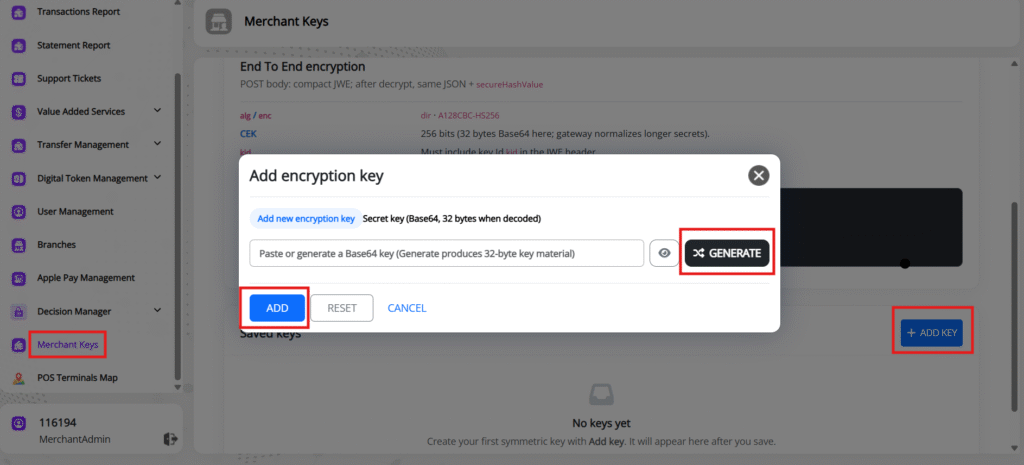
Step 1 — Open Merchant Keys #
From the Merchant Portal, navigate to:
Merchant Keys → Add Key
The Merchant Keys page provides the option to create and manage encryption keys.
Step 2 — Add a New Encryption Key #
Select Add Key.
A dialog will appear allowing you to enter or generate the encryption secret.
The portal provides a Generate option for creating key material.
Step 3 — Generate the Secret #
Select Generate to generate a Base64 key suitable for use as the merchant encryption secret.
The generated secret must be treated as confidential.
Step 4 — Save the Key #
Select Add to save the encryption key.
The newly created key will appear under Saved Keys.
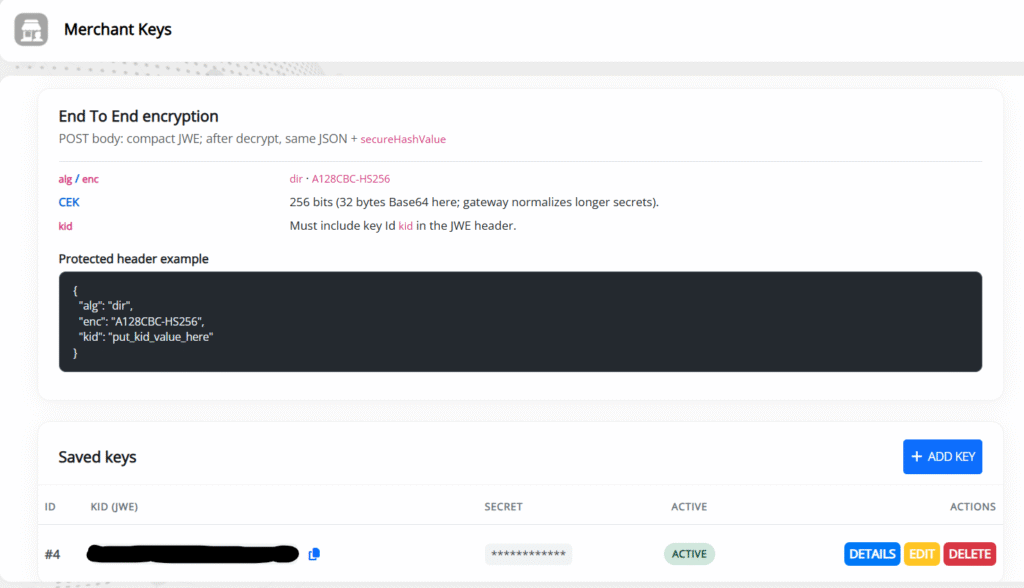
The saved key contains:
| Field | Description |
|---|---|
| ID | Internal key identifier |
| KID (JWE) | Merchant Key ID used in the JWE kid header |
| Secret | Merchant encryption secret |
| Active | Indicates whether the key is active |
| Actions | Available key management operations |
12. Using the Generated Key #
Once the encryption key has been created:
- Copy the Merchant Key ID (
kid). - Securely store the generated secret.
- Configure the secret in the server-side application.
- Include the
kidin every JWE protected header. - Use the corresponding secret to encrypt the request payload.
Example:
{
  "alg": "dir",
  "enc": "A128CBC-HS256",
  "kid": "YOUR_MERCHANT_KEY_ID"
}
Important: The
kidand secret work together. Always use the secret associated with thekidspecified in the JWE header.
13. End-to-End Request Structure #
The complete integration can be represented as:
Merchant Application
       │
       │ 1. Prepare API JSON
       ▼
┌──────────────────────────┐
│ JSON Request             │
│ + secureHashValue        │
└────────────┬─────────────┘
             │
             │ 2. JWE Encryption
             │
             │ alg = dir
             │ enc = A128CBC-HS256
             │ kid = Merchant Key ID
             ▼
┌──────────────────────────┐
│ JWE Compact Serialization│
└────────────┬─────────────┘
             │
             │ 3. HTTPS POST
             ▼
┌──────────────────────────┐
│ AMWAL Pay                │
│                          │
│ Decrypt JWE              │
│ Validate kid              │
│ Validate secureHashValue │
│ Process API request      │
└────────────┬─────────────┘
             │
             │ 4. Response
             ▼
┌──────────────────────────┐
│ Merchant Application     │
│                          │
│ Decrypt if encrypted     │
│ Validate response        │
└──────────────────────────┘


