Skip to content
logo
  • Products
    • Amwal Checkout
    • Amwal POS
    • Merchant App
    • Merchant Control Panel
  • Pricing
  • Developers
  • About us
  • Contact Us
Edit Content
  • Products
    • Amwal Checkout
    • Amwal POS
    • Merchant App
    • Merchant Control Panel
  • Pricing
  • Developers
  • About us
  • Contact Us
Login
Get Started
Login
Get Started

SMARTBOX

  • Express ApplePay Implementation
  • Offsite Implementation
  • Pre Requisites
  • Implementation

Merchant Cloud Notification

  • Merchant Cloud Notification Integration Guide

Secure Hash Calculation

  • Secure Hash Calculation

Webhooks

  • Get Order by Merchant Reference
  • Get Transaction by Merchant Reference
  • Acquiring Session Token
  • Initialize Payment
  • Encryption and Decryption
  • Refund Payment
  • Void Payment
  • Get Transaction by ID
  • Transactions with Statistics
  • Transactions Summary
  • Delete Customer Token
  • Pay by Token

Integrated Payment Link

  • Implementation

Mobile SDKs

  • Native Android SDK
    • Pre Requisites
    • Implementation
  • Native iOS SDK
    • Apple Pay Specific Configuration
    • Pre Requisites
    • Implementation
  • React Native SDK
    • Implementation
  • Flutter SDK
    • Implementation
    • Flutter SDK Overview

POS ECR

  • SDK for .NET
  • Flutter SDK
  • SDK for iOS Cocoapods
  • SDK for iOS SPM
  • Android SDK
  • React Native SDK

Plugins

  • BA Booking
    • BA Booking overview
    • BA Booking Installation
  • Woocommerce
    • WooCommerce Subscription & Recurring Payments
    • Overview
    • Woocommerce Installation
  • CS Cart
    • CS-Cart Overview
    • CS CART Installation
  • Shopify
    • Shopify Overview
    • Shopify Installation
  • Odoo
    • Odoo Overview
    • Odoo Installation
  • Laravel Package
    • Installation
    • Configuration
  • WHMCS
    • WHMCS Overview
    • WHMCS Installation
  • Magento
    • Magento 2 Overview
    • Magento Installation
  • Opencart
    • OpenCart Overview
    • Opencart Installtion
  • Wp Travel Engine
    • Wp Travel Engine Installation
  • ZenCart
    • ZenCart Overview
    • Zencart Installation
  • Drupal
    • Drupal Overview
    • Drupal Installation
  • PrestaShop
    • PrestaShop Overview
    • PrestaShop Installation
  • Contact Form 7
    • Contact Form 7 Overview
    • Contact Form 7 Installation
  • Joomla
    • Joomla Overview
    • Joomla Installation
View Categories
  • Home
  • Amwal Pay Developer Portal
  • Plugins
  • WHMCS
  • WHMCS Installation

WHMCS Installation

Introduction #

AmwalPay WHMCS module is an Omani payment gateway designed to simplify digital transactions for local businesses. It supports card payments, NFC, and e-wallets in a single platform. With AI-powered insights and smart invoicing tools, merchants can streamline payment processing and drive business growth efficiently.

Installation Steps #

Follow these steps to install the AmwalPay module on your WHMCS platform:

  1. Download Plugin here
  2. Extract the downloaded .zip file into your server’s WHMCS directory: /modules/gateways/amwalpay/
  3. Log in to the WHMCS Admin Panel.
  4. Navigate to: Setup → Apps & Integrations → Browse → Payments
  5. Search for AmwalPay Payment and click Manage.

Admin Configuration #

Once the module is installed, proceed with the configuration steps:

  1. In the WHMCS Admin Panel, go to:
    Addons → Apps & Integrations → Payments Apps
  2. Under the Manage Existing Gateways tab, locate and configure AmwalPay.
  3. Enter the following credentials:
    • Merchant ID (provided by Amwal)
    • Terminal ID
    • Secret Key
  4. Ensure the correct Environment is selected:
    • UAT for testing
    • LIVE for production
  5. Optionally enable Debug Log to store transaction logs at:/modules/gateways/amwalpay/
  6. Click Save Changes to apply the configuration.

Testing the Gateway #

  • Set the environment to UAT
  • Use test credentials provided by AmwalPay
  • Simulate payment transactions in WHMCS
  • Once validated, switch to LIVE for real payments

Troubleshooting #

IssueResolutionPayment not processedCheck if credentials (Merchant ID, Terminal ID, Secret Key) are correctInvalid environment Make sure the selected environment (UAT or LIVE) matches the credentials Logs not recordedEnsure debug mode is enabled and the directory is writable

Additional Notes #

  • Refunds must be managed directly through the Amwal provider dashboard.
  • AmwalPay’s hosted checkout ensures PCI-compliant processing of sensitive data.
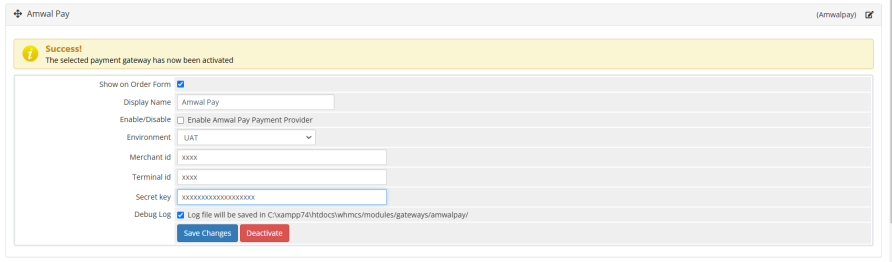
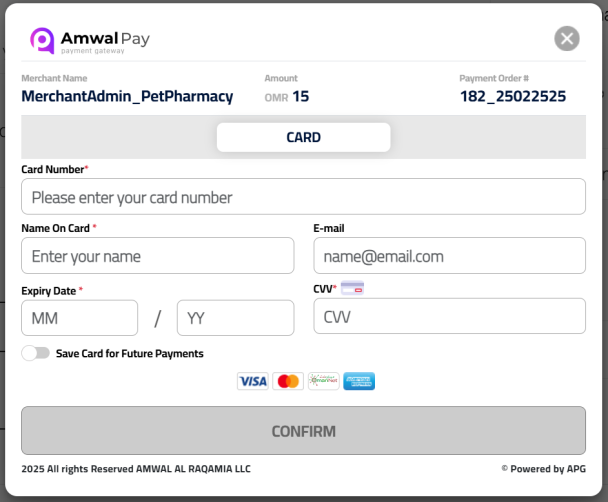
screenshot-1screenshot-2

What are your Feelings

Share This Article :

  • Facebook
  • X
  • LinkedIn
  • Pinterest
Still stuck? How can we help?

How can we help?

Updated on September 15, 2026
WHMCS Overview
Table of Contents
  • Introduction
  • Installation Steps
  • Admin Configuration
  • Testing the Gateway
  • Troubleshooting
  • Additional Notes

Secure. Seamless – Powering Payments for Every Business.

Sign Up
Support

4th Floor, Majan Tower Building
North Al Ghubrah, P.O. Box 233, P.C 118
Muscat, Sultanate of Oman

: support@amwal-pay.com

📞 : +96824121845

Resources
  • Developers
  • Careers
Company
  • About us
  • Contact Us
  • Contact Sales
  • Partners

2026 © AmwalPay. All Rights Reserved.

  • Terms & Conditions
  • Privacy Policy